 GroupAITools
Canva Pro group buy India: premium design for ₹299 a month
Canva Pro group buy India access gives you Canva’s premium templates, elements and tools through a shared plan for ₹299/month on GroupAI Tools, paid with UPI. This guide explains what you get, what you do not get, how it compares with buying Canva Pro from Canva, and how creators, students and small businesses in India use it.
We sell this access. Canva publishes Indian rupee pricing on its own website, and prices change with offers and plan updates, so check canva.com/pricing for the current official figure before you decide.
Short answer: Canva Pro group buy India on GroupAI Tools costs ₹299/month. You get premium templates, photos, elements and Pro tools such as the background remover and Magic Resize in a private session. Your designs live in a shared workspace and brand settings are not personal, so businesses that need their own Brand Kit and team folders should buy Canva directly.
What Canva Pro adds over free Canva
Free Canva is generous: thousands of templates, basic editing and downloads. Canva Pro unlocks the premium library of templates, photos, videos, graphics and fonts, plus tools that save time on every project. The ones Indian users mention most are the one-click background remover, Magic Resize (turning one design into many sizes), Brand Kit for logos, colours and fonts, premium stock media without watermarks, and Canva’s AI features for writing and image editing.
For most Indian users the premium library is the biggest difference. Free templates are good, but the best-designed festival, business and social templates are often marked Pro, and premium photos and elements remove the watermark problem when you download. If you have ever found the perfect template and then seen a crown icon on it, that is what Canva Pro group buy India access unlocks.
Exact features and AI usage allowances change as Canva updates its plans, so treat Canva’s own feature list as the source of truth.
Canva Pro group buy India vs Canva’s own plan
| Factor | Canva Pro group buy India (us) | Canva Pro from Canva |
|---|---|---|
| Price | ₹299/month | Rupee pricing on canva.com/pricing |
| Payment | UPI, RuPay, cards, net banking | UPI and cards supported by Canva in India |
| Account | Private session on a shared plan | Your own account and workspace |
| Brand Kit | Not personal; do not rely on it | Your own logos, colours and fonts |
| Design storage | Download and keep your files | Saved in your account |
| Team folders and approvals | Not available | Available on Teams plans |
| Best for | Occasional and project-based design | Businesses and daily design work |
Canva is one of the few major design tools with an official Indian rupee price, and for daily business use buying direct is a sensible choice. Canva Pro group buy India access suits people who design occasionally, want to try Pro before committing, or need premium elements for a specific project. Details are on our Canva Pro group buy page.
Working safely in a shared Canva workspace
- Download every finished design as PNG, PDF or MP4 and keep it on your device or Google Drive.
- Do not upload private documents, ID cards or client files with personal data.
- Do not store your brand assets only in the shared Brand Kit; keep the originals yourself.
- Do not delete or edit designs that are not yours.
- Rename your designs clearly so you can find them quickly in your session.
These habits make Canva Pro group buy India access reliable for real work. They take a minute per design and mean you never lose a finished poster, thumbnail or presentation, whatever happens to the shared workspace later.
Who gets the most from Canva Pro
Instagram and YouTube creators
Creators use premium templates for posts, Reels covers and YouTube thumbnails, then Magic Resize to adapt them for every platform. Pair Canva with CapCut Pro (₹299/month) for video editing and vidIQ (₹499/month) for topic research.
Small businesses and online sellers
Shop owners design festive offers, WhatsApp catalogue images, menus, visiting cards and flyers. For product photos with clean white backgrounds, Photoroom Pro (₹299/month) is faster than editing each image by hand.
Students and teachers
Presentations, posters, certificates and project reports look far more professional with premium templates. Teachers use Canva for worksheets and classroom posters.
Freelance designers and marketers
Freelancers use Canva for fast client deliverables and social media calendars. For original illustrations or concept art, add Midjourney (₹499/month) or Ideogram (₹399/month), and for stock vectors, Freepik (₹399/month).
Canva Pro features worth learning first
Background remover
Upload a photo, click once, and the background is removed. Ideal for product photos, profile pictures and thumbnails.
Magic Resize
Design once, then resize for Instagram post, story, YouTube thumbnail and WhatsApp status in seconds.
Premium templates and elements
Search by occasion, such as Diwali, Holi, Eid, Independence Day, wedding invitation or admission open, and filter for Pro templates.
Canva’s AI tools
Canva includes AI features for generating images, writing text and editing photos. Usage allowances depend on the plan and can be shared on group buy access, so plan heavy AI work accordingly.
Content Planner and scheduling
Pro plans can schedule posts to social platforms. On shared access, connecting your own social accounts is not recommended; download and post from your own phone instead.
A one-month Canva Pro plan for a small business
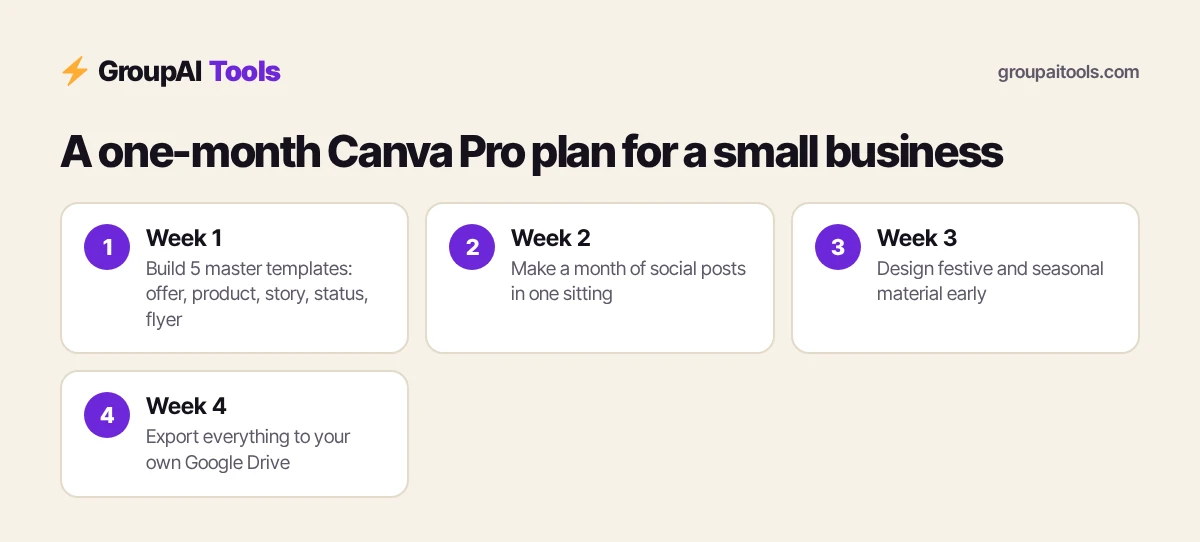
- Week 1: collect your logo, colours and two fonts, and build five master templates: offer post, product post, story, WhatsApp status and flyer.
- Week 2: produce a month of social posts in one sitting using those templates.
- Week 3: design festive and seasonal material ahead of time.
- Week 4: export everything to your own Google Drive in organised folders.
With this approach, a single month of Canva Pro group buy India access can produce enough material for several months of posting.
Making YouTube thumbnails and Instagram posts that work
Thumbnails and feed posts are judged in a fraction of a second on a small screen. The designs that work best usually have one clear subject, three to five words of large text, and strong contrast between the text and the background. Canva Pro’s background remover makes it easy to cut out a face or product and place it on a bold colour, which is the most common thumbnail style for Indian creators.
Build a template once with your fonts and colours, then duplicate it for every new video so your channel looks consistent. Use Magic Resize to turn the same idea into a Reels cover, a story and a community post. Test two versions of a thumbnail on important videos and keep the style that earns more clicks. Canva Pro group buy India access is enough for this whole workflow; you do not need a separate design suite.
Presentations, resumes and documents
Canva’s presentation editor is popular with Indian students and professionals because premium templates look polished without design skills. Choose a simple template, keep one idea per slide, and use Canva’s charts for numbers instead of pasting screenshots from spreadsheets. You can present directly from the browser or download as PDF or PPTX for college and office use.
Resume templates are another favourite. Pick a clean, single-column layout for applications that may pass through applicant tracking systems, and save a PDF copy. Avoid heavy graphics, photos and tables in resumes for corporate roles; recruiters prefer clear text. For cover letters and LinkedIn summaries, a chat assistant such as ChatGPT Plus (₹399/month) can draft the text before you design.
Printing Canva designs in India
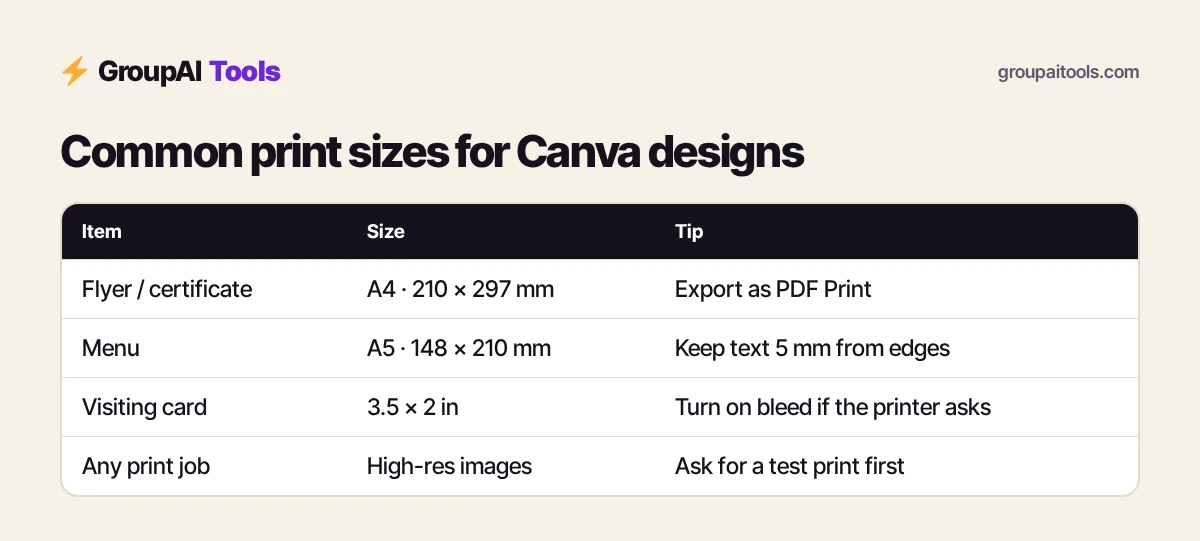
- Download print files as “PDF Print” and turn on crop marks and bleed when your printer asks for them.
- Set the right size at the start: A4 (210 × 297 mm) for flyers and certificates, A5 for menus, and standard visiting cards at 3.5 × 2 inches.
- Keep important text at least 5 mm inside the edge so it is not trimmed.
- Use high-resolution images; low-quality photos look blurry when printed.
- Ask your local printer for a test print before ordering hundreds of copies, because colours on paper often look darker than on a phone screen.
Many small businesses in India print banners, standees and flyers locally. Getting these basics right with Canva Pro group buy India access saves reprinting costs.
Common Canva mistakes to avoid
- Using too many fonts. Two fonts, one for headings and one for body text, look more professional.
- Crowding the design. White space makes the key message easier to read.
- Copying a popular template without changing it. Customers recognise generic designs.
- Forgetting to download final files before your plan ends.
- Using a premium element in a logo, which Canva’s licence restricts.
Fixing these mistakes improves almost any design, whether you use free Canva or Canva Pro group buy India access.
Canva for festivals and seasonal marketing
Indian businesses run on a festival calendar: Republic Day and Independence Day sales, Holi, Eid, Raksha Bandhan, Ganesh Chaturthi, Navratri, Durga Puja, Diwali, Christmas and the wedding season. Each brings a spike in searches, gifting and shopping, and businesses that post early usually get more attention than those who post on the day.
Use Canva Pro’s premium festival templates to prepare a pack of designs two or three weeks ahead: a greeting post, an offer post, a story, a WhatsApp status and a printable flyer. Keep the brand colours consistent but change the festive elements. Schedule a reminder to update dates and prices before each festival.
With one focused session each month, Canva Pro group buy India access can cover every festival and sale on your calendar, and the designs remain yours once you download them.
Canva Pro group buy India checklist before you start
- Write down the designs you need this month.
- Collect your logo, colours, fonts and product photos in one Google Drive folder.
- Decide which sizes each design needs before you open Canva.
- Download every finished file the same day you make it.
- Note any elements you plan to use commercially and check Canva’s licence.
A little planning turns a month of Canva Pro group buy India access into months of finished content.
Canva Pro alternatives on GroupAI Tools
| Tool | Our price | Choose it when |
|---|---|---|
| Adobe Express | ₹199 (one-time) | You prefer Adobe’s templates and fonts |
| Crello (VistaCreate) | ₹99/month | You want a Canva-style editor with animation |
| Freepik | ₹399/month | You mainly need stock vectors and photos |
| Envato Elements | ₹99/month | You need templates for video, web and print |
| Kittl | ₹369/month | You design t-shirts, logos and posters |
| Placeit | ₹179/month | You need mockups for merch and products |
See every design tool in the design and image hub or our best group buy AI tools India guide.
Licensing and commercial use
Canva’s content licence explains how you can use templates, photos and elements in commercial work, and it has restrictions, for example on using certain elements as trademarks or logos, or reselling templates as they are. Read Canva’s licence pages before using premium elements in client work or products for sale.
Shared access does not change those licence rules, and you should not assume shared access gives you the same licence rights as your own paid account. If licensing certainty matters for your business, for example for packaging, printed merchandise or advertising, buy Canva Pro in your own name.
How to buy
Here is how buying works on GroupAI Tools. You pick Canva Pro or another tool on its page, pay in rupees with UPI (GPay, PhonePe, Paytm, BHIM), RuPay, cards or net banking, and the tool appears in your dashboard. You open it from Dashboard Login at app.groupaitools.com in a private, isolated browser session, so you never type or see a shared password.
Software that is sold as a licence rather than a web app is delivered as a licence key or an activation by email or WhatsApp instead. WhatsApp support runs from 9:00 AM to 11:30 PM IST, and every tool page shows the 48-hour refund guarantee.
Is Canva Pro group buy India allowed?
Canva’s terms are written for individual accounts and teams under one organisation. Sharing accounts outside those rules is not permitted, so a shared plan can be restricted by Canva. That would interrupt access until it is restored. The lower price reflects that risk.
We bill monthly, use private sessions and publish a refund rule to reduce the impact. Read is group buy safe for more detail.
Design tips for Indian audiences
- Keep text large and short: most people will see your design on a phone, often in a WhatsApp preview.
- Use high-contrast colours for readability in bright sunlight.
- Include prices in rupees with the ₹ symbol and clear offer dates.
- For regional audiences, use Canva’s Indian language fonts and have a native speaker check spelling.
- Add your WhatsApp number or UPI QR code where customers expect to act.
Good design is about clarity more than decoration, especially for Indian mobile audiences scrolling quickly through feeds and status updates.
FAQs
How much is Canva Pro group buy in India?
On GroupAI Tools, Canva Pro group buy costs ₹299/month, paid by UPI, RuPay, cards or net banking.
What is the official Canva Pro price in India?
Canva publishes rupee pricing on canva.com/pricing, and offers change often, so check that page for the current figure.
Can I use my own Brand Kit?
You can add brand assets in your session, but the workspace is shared, so keep originals yourself. For a personal Brand Kit, buy Canva directly.
Will my designs be saved?
Designs may remain in the session, but always download finished work and keep your own copies.
Can I use Canva Pro on my phone?
Yes, through the browser from your dashboard. The Canva mobile app requires your own account.
Can I use premium elements commercially?
Canva’s licence sets the rules for commercial use. Read it before client or product work, and buy your own plan if licensing certainty matters.
What is the best Canva Pro alternative?
Adobe Express at ₹199 (one-time) or VistaCreate (Crello) at ₹99/month on GroupAI Tools.