 GroupAITools
How to use Ahrefs: a step-by-step beginner guide for Indian websites

Ahrefs is one of the most respected SEO tools in the world, and learning how to use Ahrefs well can change how you plan content and links. The problem for beginners is that it has dozens of reports and many numbers, such as DR, UR, KD and traffic potential, that mean little at first. This guide shows you how to use Ahrefs in ten practical steps for an Indian website: setting the country, studying competitors, finding keywords, checking backlinks, auditing your site and tracking rankings.
You can follow along on any paid Ahrefs plan, on our Ahrefs group buy at ₹999/month, or partly on the free Ahrefs Webmaster Tools for your own site. We point out where a step needs your own account. For deeper detail, use Ahrefs Academy and the Ahrefs Help Center.
Short answer: how to use Ahrefs in one line: set the country to India, put three competitors into Site Explorer and study their Top pages and Organic keywords, build a keyword list in Keywords Explorer using KD and traffic potential, find link gaps, then audit your site and track rankings. Ahrefs plans started at $29 a month for Starter (about ₹2,752) on 25 Oct 2026; shared Ahrefs on GroupAI Tools is ₹999/month.
Before you start: what you need
- Access to Ahrefs: a paid plan, shared access, or free Ahrefs Webmaster Tools for sites you own.
- Your website and three competitors that rank for your main topics in Google India.
- A spreadsheet to save keywords, pages and link prospects.
- Google Search Console for your own site, to compare Ahrefs estimates with real data.
Plan prices in rupees are in our Ahrefs price in India guide. If you are still choosing a tool, read Ahrefs vs Semrush.
Key Ahrefs terms in plain English
| Term | What it means |
|---|---|
| DR (Domain Rating) | How strong a whole site’s backlink profile is, on a 0–100 scale |
| UR (URL Rating) | The same idea for a single page |
| KD (Keyword Difficulty) | An estimate of how hard it is to reach the top 10, based on the links of pages that rank |
| Volume | Estimated monthly searches in the chosen country |
| Traffic potential | Estimated traffic the top page gets from all the keywords it ranks for |
| Organic traffic | Ahrefs’ estimate of monthly visits from search |
Remember these are Ahrefs’ estimates. They are excellent for comparing sites and keywords, but your real traffic is in Google Search Console.
Step 1: set the country to India
The first rule of how to use Ahrefs for an Indian site is to set the country to India in reports that support it. Keyword volumes, difficulty and organic traffic all change by country. A keyword with big US volume can have little demand in India, and the other way round.
In Keywords Explorer, pick India from the country list before you search. In Site Explorer’s organic reports, filter the country to India so you see the keywords that matter for Google India.
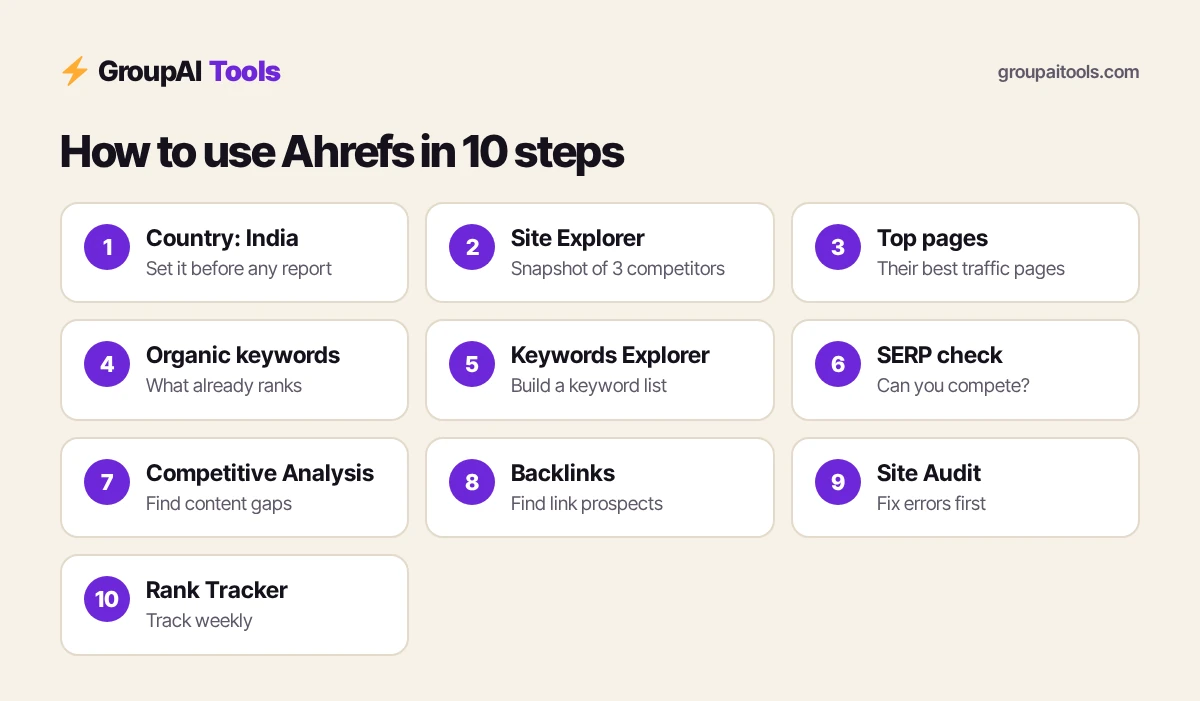
Step 2: study a competitor in Site Explorer
Enter a competitor’s domain in Site Explorer. The Overview shows estimated organic traffic, DR, referring domains and how traffic has changed over time. Note three things:
- Whether their traffic is growing or falling, and when big changes happened.
- How many referring domains they have compared with you.
- Which countries their traffic comes from.
Do this for three competitors. Patterns across all three tell you what Google India rewards in your niche.
Step 3: find what works with Top pages
Top pages is one of the most useful reports when you learn how to use Ahrefs. It lists a site’s pages by estimated organic traffic, with each page’s top keyword. Filter to India and look for topics that bring your competitors lots of traffic but that you have not covered.
Export the list and mark pages you could beat with a better, more up-to-date, more India-specific article.
Step 4: dig into Organic keywords
Organic keywords shows every keyword a site ranks for, with position, volume, KD and the ranking URL. Filter by position 1–20 to see what already works for them, and by KD to find easier wins. Use the report’s comparison option to see keywords where they recently gained or lost positions; recent losses can be openings for you.
Step 5: build a keyword list in Keywords Explorer
Type a seed keyword such as “group buy seo tools” or “best laptop under 50000”, choose India, and open the keyword ideas reports:
- Matching terms for phrases that contain your seed words.
- Related terms for keywords the top pages also rank for.
- Questions for what people ask, ideal for FAQs and how-to posts.
- Use KD, volume and traffic potential filters to find realistic targets.
New sites should start with low-KD keywords that still have decent traffic potential. Save the best ones to a keyword list.
Step 6: check the SERP before you write
For every keyword you plan to target, scroll to the SERP overview in Keywords Explorer. It shows the pages ranking now, with their DR, UR, backlinks and traffic. If the top results are all huge brands with strong links, a new site will struggle. If you see forums, thin pages or small blogs, you have a chance.
This habit saves weeks of writing articles you cannot rank for, and it is the step most beginners skip when they learn how to use Ahrefs.
Step 7: find content gaps with Competitive Analysis
Ahrefs’ Competitive Analysis report (earlier called Content Gap) compares your site with several competitors. Enter your domain and up to a handful of competitors to see keywords they rank for that you do not. Sort by volume and KD and pick five to ten realistic topics for this month.
Step 8: check backlinks and find link gaps
In Site Explorer, open Backlinks and Referring domains for a competitor. Look at who links to them and why: guest posts, resource pages, news mentions, tools or data studies. The same Competitive Analysis report can also show sites that link to your competitors but not to you, which are your best outreach prospects.
- Prioritise relevant Indian sites in your niche over random high-DR sites.
- Check Broken backlinks for links pointing to dead competitor pages you could replace.
- Pitch something useful: a guide, data, a tool or an expert quote.
Step 9: audit your site with Site Audit
Create a project for your website and run Site Audit. Ahrefs crawls your pages and reports issues such as broken links, missing or duplicate titles, redirect chains, slow pages and orphan pages, with a health score. Fix errors first, then warnings, and rerun the crawl.
Projects belong to an account, so for ongoing audits of your own site use Ahrefs Webmaster Tools, which is free for verified sites, or your own paid account. On shared access, projects may not be private or persistent.
Step 10: track rankings with Rank Tracker
Add your target keywords to Rank Tracker with India, or your city, as the location, and include two or three competitors. Check weekly rather than daily, since rankings move naturally. Over a few months the trend shows whether your content and links are working.
How to use Ahrefs every week: a beginner routine
| Day | Task (about 30 minutes) |
|---|---|
| Monday | Rank Tracker: note big movers |
| Tuesday | Keywords Explorer: add 10 India keywords to your list |
| Wednesday | SERP check on 3 keywords before writing |
| Thursday | Backlinks: find 5 link prospects from a competitor |
| Friday | Fix the top 5 Site Audit issues |
A short routine like this is how to use Ahrefs consistently without living inside it.

How to use Ahrefs for a new blog: a 30-day plan
- Week 1: export Top pages and Organic keywords for three competitors.
- Week 2: build a 40-keyword list in Keywords Explorer with low KD and clear intent.
- Week 3: write your first five articles, checking each SERP first.
- Week 4: set up Webmaster Tools or Site Audit, fix errors, and add your 40 keywords to Rank Tracker.
After a month you have a quarter’s content plan and a baseline to measure progress.
Free ways to use and learn Ahrefs
Ahrefs Webmaster Tools gives site owners free site audits and backlink data for websites they verify. Ahrefs also offers free single-lookup tools on its website, such as a keyword generator and backlink checker, and Ahrefs Academy has free courses on SEO and on Ahrefs itself. Practise on your own blog first; real data teaches faster than any course.
Common mistakes when learning how to use Ahrefs
- Leaving the country on the US for an Indian site.
- Chasing high-volume keywords with very high KD on a new site.
- Treating traffic estimates as exact numbers.
- Building links from irrelevant high-DR sites instead of relevant Indian ones.
- Running Site Audit once and never again.
Which Ahrefs plan do you need for this guide?
Ahrefs’ pricing page on 25 Oct 2026 listed Starter at $29 a month (about ₹2,752), Lite at $129 (about ₹12,242), Standard at $249 (about ₹23,630) and Advanced at $449 (about ₹42,610). Starter is limited; Lite and above cover the full workflow above. Shared Ahrefs on GroupAI Tools at ₹999/month covers the research steps for learners and freelancers on a budget. Read Ahrefs group buy India for the limits.
Dollar conversions on this page use ₹94.9 per US dollar, the reference rate on 23 Oct 2026 (the last trading day before this update). Your bank or card network applies its own rate and may add a forex markup of a few per cent, and GST at 18% can apply to foreign digital services bought by Indian customers, so your statement can differ.
Here is how buying works on GroupAI Tools. You pick Ahrefs or another tool on its page, pay in rupees with UPI (GPay, PhonePe, Paytm, BHIM), RuPay, cards or net banking, and the tool appears in your dashboard. You open it from Dashboard Login at app.groupaitools.com in a private, isolated browser session, so you never type or see a shared password.
Software that is sold as a licence rather than a web app is delivered as a licence key or an activation by email or WhatsApp instead. WhatsApp support runs from 9:00 AM to 11:30 PM IST, and every tool page shows the 48-hour refund guarantee.
Explore more SEO tools on our SEO tools hub, compare how to use Semrush, and read is group buy safe? before you pay any seller.
FAQs
How do I use Ahrefs for keyword research?
Open Keywords Explorer, choose India, enter a seed keyword, then use Matching terms, Related terms and Questions with KD, volume and traffic potential filters. Check the SERP before writing.
Can I use Ahrefs for free?
Ahrefs Webmaster Tools is free for sites you verify, and Ahrefs has free single-lookup tools on its website. Full Site Explorer and Keywords Explorer need a paid plan or shared access.
What is DR in Ahrefs?
Domain Rating is Ahrefs’ 0–100 score for the strength of a website’s backlink profile. It is useful for comparing sites, not a Google metric.
How do I check a competitor’s backlinks in Ahrefs?
Enter the domain in Site Explorer and open the Backlinks or Referring domains report.
How long does it take to learn how to use Ahrefs?
Most beginners learn the core reports in one or two weeks of regular practice. Ahrefs Academy’s free courses help.
Is Ahrefs better than Semrush for beginners?
Many beginners find Ahrefs’ reports clean and easy to read; Semrush offers more tools in one suite. See our Ahrefs vs Semrush comparison.
What is the cheapest way to use Ahrefs in India?
Shared Ahrefs on GroupAI Tools costs ₹999/month. Ahrefs’ own plans started at $29 a month for Starter on 25 Oct 2026.